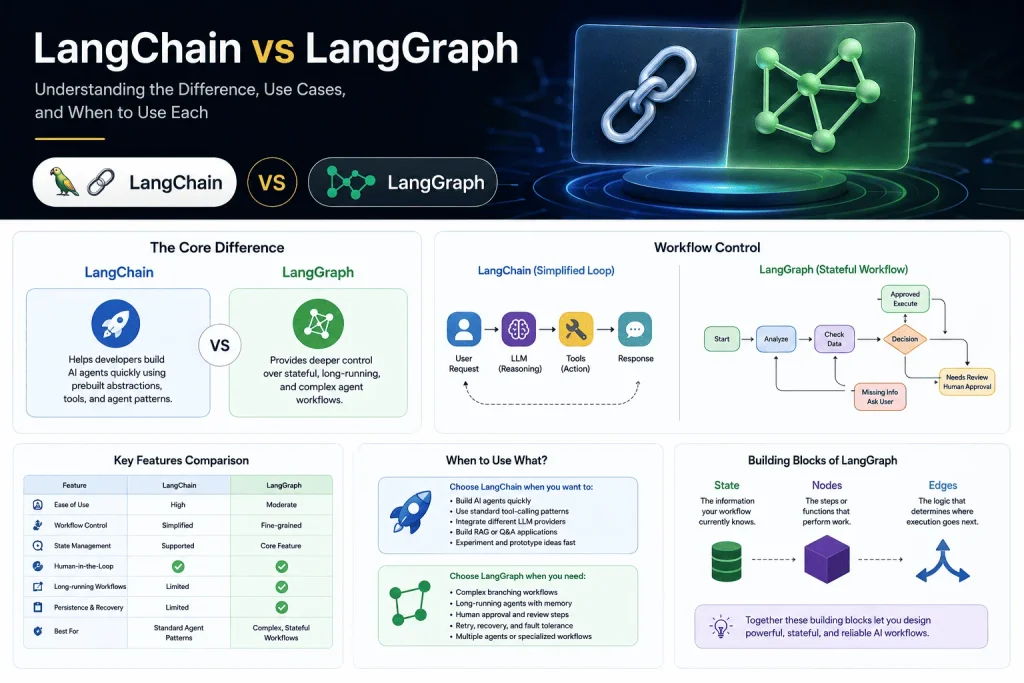

LangChain gives developers a higher-level way to build AI agents with models, tools, and common agent patterns. LangGraph provides lower-level orchestration for stateful, long-running, and highly customized agent workflows.
The practical approach: Start with LangChain when your workflow is straightforward, and introduce LangGraph when you need explicit state, branching, persistence, human approval, or more control over execution.
Artificial intelligence applications are changing fast.
A few years ago, connecting an LLM to a chatbot was impressive. Today, developers expect AI systems to search databases, call APIs, use external tools, remember previous interactions, ask humans for approval, and recover when something goes wrong.
That creates a new engineering problem.
Building an AI demo is relatively easy. Building an AI system that behaves reliably when the workflow becomes complicated is much harder.
This is where LangChain and LangGraph become particularly interesting.
At first glance, they can seem like competing technologies. Should you use LangChain? Is LangGraph replacing it? Do you need to learn both?
The simplest answer is:
LangChain helps you build agents faster. LangGraph gives you deeper control over how those agents execute.
And understanding that difference can save you from adding unnecessary complexity to your AI application.
LangChain vs LangGraph: The Core Difference
Key Takeaway: LangChain focuses on making common AI agent patterns easier to build, while LangGraph focuses on giving developers precise control over complex workflows. Think of LangChain as a faster starting point and LangGraph as a lower-level orchestration layer when your workflow needs more structure.
The easiest way to understand the difference is to look at the level of abstraction.
LangChain is an AI agent framework designed to simplify common development tasks. It provides standardized ways to work with language models, tools, prompts, data sources, and agent workflows. Instead of writing separate integration logic for every model provider, developers can use a more consistent interface and focus on the application itself.
According to the official LangChain documentation, the framework now centers heavily around agent development, model integrations, tools, and a production-ready agent architecture.
LangGraph, on the other hand, is a lower-level framework for building stateful workflows and agents. Instead of simply defining an agent and letting a predefined loop handle everything, you can explicitly define what happens at each stage.
LangGraph models applications using three important concepts:
- State — the information your workflow currently knows
- Nodes — the steps or functions that perform work
- Edges — the logic that determines where execution goes next
The official LangGraph Graph API overview explains how these building blocks allow developers to create workflows with branching, loops, and evolving state.
A Simple Comparison
| Feature | LangChain | LangGraph |
|---|---|---|
| Primary purpose | Build AI agents quickly | Orchestrate complex AI workflows |
| Abstraction level | Higher level | Lower level |
| Best for | Standard agent patterns | Custom agent architectures |
| Workflow control | Simplified | Fine-grained |
| State management | Supported through the agent stack | Core part of the architecture |
| Human approval | Available through integrations and middleware | Native workflow capability |
| Long-running workflows | Supported through LangGraph runtime | Designed specifically for them |
| Learning curve | Easier to start | More architectural thinking required |
The important thing to understand is that LangChain and LangGraph are not really enemies competing for the same job.
In fact, modern LangChain agents run on LangGraph’s underlying runtime. That means developers can benefit from higher-level abstractions while still gaining capabilities such as persistence and human-in-the-loop workflows.
Why LangChain Is Often the Best Starting Point
Key Takeaway: If your AI application follows a familiar pattern—user asks something, the model reasons, uses a tool if necessary, and returns an answer LangChain can get you moving quickly without forcing you to design a complete workflow graph.
Most AI applications do not need a complicated architecture on day one.
Imagine you are building a customer support chatbot. A user asks a question, the AI searches your documentation, retrieves relevant information, and generates an answer.
That workflow might look like this:
User Question → AI Model → Search Tool → AI Model → Response
This is exactly the type of problem where LangChain is useful.
Its agent architecture can manage the familiar loop of:
- Receive a user request
- Let the model decide whether it needs a tool
- Execute the selected tool
- Send the result back to the model
- Return a final response
The current LangChain agents documentation describes agents as systems that combine language models with tools and continue working until they reach a stopping condition.
This is particularly useful for developers building:
- AI customer support bots
- RAG applications
- AI research assistants
- Document Q&A systems
- Internal knowledge assistants
- Tool-using chat applications
For a developer, the biggest advantage is speed.
You can spend less time building infrastructure and more time thinking about what tools your AI should have access to and what problem it should solve.
That is important because AI development is already complicated enough. Adding unnecessary architecture too early can slow down experimentation.
Where LangGraph Becomes More Powerful
Key Takeaway: LangGraph becomes valuable when your AI application stops being a simple conversation and starts behaving like a process especially when it needs branching, retries, approvals, memory, or multiple steps that must happen in a specific order.
Here is where my perspective as someone interested in building AI chat applications and automation becomes important.
A simple AI chatbot is relatively easy.
A reliable AI system is much harder.
Suppose you are building an AI customer support platform. The AI receives a refund request. Before responding, the system may need to:
Understand the request → Verify the user → Check the order → Apply company policy → Ask for human approval → Process the action → Notify the customer
Now imagine some additional possibilities:
- What happens if the order API fails?
- What if the customer needs human support?
- What if the workflow must pause for manager approval?
- What if the application crashes halfway through?
- What if the AI needs to resume from where it stopped?
This is where a graph-based architecture starts making sense.
LangGraph is designed for workflows that are stateful and potentially long-running. Its official documentation highlights capabilities including durable execution and human-in-the-loop workflows.
A workflow can conceptually look like this:
Start → Analyze Request → Check Data → Make Decision
From there, the workflow may branch:
- Approved → Execute action
- Needs review → Pause for human
- Missing information → Ask user
- API failure → Retry or escalate
This is much closer to how real business processes actually work.
The Most Important Insight: AI Agents Should Not Control Everything
The biggest advantage of LangGraph is not simply that it uses graphs. It allows developers to decide which parts of a system should be controlled by AI and which parts should remain deterministic code.
This distinction is extremely important.
LLMs are flexible, but flexibility is not always desirable.
You might want an AI model to decide:
“Which support document is relevant to this user’s question?”
But you probably do not want the model deciding:
“Should we charge this customer’s credit card?”
Some parts of an application should be intelligent and probabilistic. Other parts should be predictable and deterministic.
LangGraph makes it easier to combine both.
For example:
AI Decision → Deterministic Validation → API Action → Human Approval → AI Response
This hybrid approach is one of the strongest architectural patterns for production AI systems.
Instead of giving the LLM complete control, you allow it to operate within carefully designed boundaries.
The same idea applies to sensitive tool actions. LangChain’s human-in-the-loop middleware can pause an agent when it proposes certain actions, allowing a person to approve, edit, or reject the action before execution. The workflow state can then be resumed afterward.
Persistence and State: The Feature Developers Eventually Need
One feature that becomes increasingly important as AI applications grow is state.
A normal function receives input and produces output. If the application stops, the function usually starts again.
But AI agents often behave more like ongoing processes.
For example:
- An agent starts researching a topic
- Calls multiple APIs
- Saves intermediate results
- Waits for human approval
- Resumes several hours later
That requires persistence.
LangGraph uses checkpointing to support capabilities such as memory, recovery after failures, human-in-the-loop workflows, and replaying previous executions for debugging.
For me, this is one of the biggest differences between building an impressive AI demo and building something closer to a production system.
A demo only needs to work.
A production AI system needs to answer harder questions:
What happens when something fails?
When Should You Choose LangChain?
Choose LangChain when you want to:
- Build an AI agent quickly
- Use standard tool-calling patterns
- Integrate different LLM providers
- Build RAG or document Q&A applications
- Experiment with AI product ideas
- Avoid designing complex workflow infrastructure too early
It is particularly useful when your application follows a relatively standard loop:
Model → Tool → Model → Response
For many applications, that is enough.
When Should You Choose LangGraph?
Choose LangGraph when you need:
- Complex branching workflows
- Long-running agents
- Explicit state management
- Human approval steps
- Retry and recovery logic
- Multiple agents or specialized workflows
- A mixture of AI reasoning and deterministic code
- More control over latency and execution
The key is not to adopt LangGraph simply because your application uses AI.
Use it when the workflow itself becomes complex.
The LangChain team’s comparison of LangChain and LangGraph describes this distinction clearly: LangGraph is particularly useful when an agent does not fit a standard loop and you need to mix deterministic and agentic workflows.
FAQ
Is LangGraph replacing LangChain?
No. They serve different purposes. LangChain is a higher-level framework for building agents, while LangGraph provides lower-level orchestration and runtime capabilities. LangChain agents are built on LangGraph.
Should beginners learn LangChain or LangGraph first?
Start with LangChain if you are learning how AI agents, tools, prompts, and model integrations work. Move into LangGraph when you need greater control over workflows and state.
Can I use LangChain and LangGraph together?
Yes. This is often the most practical approach. You can use LangChain for agent logic and integrations while using LangGraph to orchestrate more complex workflows.
Is LangGraph only for multi-agent systems?
No. LangGraph can be used for simple single-agent workflows as well. However, its biggest advantages become clearer when applications need complex state, branching, persistence, or long-running execution.
Conclusion: Start Simple, Add Control When You Need It
Key Takeaway: You do not need to choose between LangChain and LangGraph as if they are competing technologies. Start with the level of abstraction that matches your problem, then move toward greater control as your AI system becomes more complex.
The best lesson from the LangChain and LangGraph ecosystem is that architecture should follow complexity.
If you are building your first AI chatbot, start simple. Give the model useful tools, connect your knowledge base, and focus on delivering value to users.
If that chatbot evolves into a system that needs approvals, retries, persistent state, complex decision-making, or multiple workflows, then LangGraph becomes a powerful next step.
Modern AI development is moving beyond the question:
“How do I connect an LLM to my app?”
The more important question is:
“How do I design an AI system that remains reliable when the workflow becomes complicated?”
That is where the combination of LangChain and LangGraph becomes especially powerful. LangChain helps developers move fast, while LangGraph provides the control needed when AI applications begin to behave less like simple chatbots and more like real software systems.
If you are building AI chatbots, automation tools, or agent-based applications, my recommendation is simple: start with the problem, not the framework.
Use LangChain when speed and standard patterns are enough. Reach for LangGraph when your agent needs structure, memory, control, and resilience.
And most importantly, don’t assume that a more complex architecture automatically means a better AI product.
Start simple. Measure what breaks. Then add complexity where it actually creates value.
What are you building with LangChain or LangGraph? Share your experience and let’s discuss whether your AI application really needs a graph or whether a simpler agent architecture is the smarter choice.