

Here’s something that caught me off guard while researching home network vulnerabilities: most people believe that simply having a password on their WiFi makes them secure. I used to think the same thing until I started digging into the numbers.
The reality is far more unsettling. In 2025 alone, researchers disclosed 937 new wireless CVEs, averaging 2.5 new vulnerabilities discovered every day. Think about that two and a half new security holes every single day, and your router firmware probably hasn’t been updated in months.
I started paying attention to my own network setup and realized I’d made several mistakes: my router was running outdated firmware, I hadn’t changed the default admin password in years, and I had no idea what devices were actually connected to my network. If you’re reading this and thinking “sounds familiar,” you’re not alone.
Your Wi‑Fi Network Has Hidden Security Gaps Here’s What Most People Miss
Your Wi‑Fi can look secure on the surface and still leak data, expose devices, or invite attackers through weak settings. The biggest risks often come from features people trust too much, not just bad passwords.
The WPA3 Problem Nobody Talks About
When WPA3 rolled out as the latest WiFi security standard, it was celebrated as a major step forward from the aging WPA2 protocol. The promise was clear: significantly stronger encryption, better password protection, and enhanced privacy. But here’s where it gets complicated.
What makes this particularly concerning is that WPA3’s backward compatibility with WPA2 creates a downgrade attack vulnerability, where attackers can force devices to use weaker security protocols. An attacker could theoretically set up a rogue WiFi network mimicking your network name (SSID), trick your devices into connecting to it, and then intercept your data.
Updating Fully patched WPA3 implementations are not known to be vulnerable to the original Dragonblood attacks, and organizations running current firmware on actively maintained access points should be protected. However, this assumes your router manufacturer has actually released patches and that you’ve installed them.
The Silent Threat: Your Smart Home Devices
I had a realization while installing a new smart home device: manufacturers are prioritizing convenience over security. That smart speaker on your shelf, the connected thermostat, the security camera they’re all potential entry points into your network.
An estimated 80% of IoT devices are vulnerable to a wide range of attacks and threats, with many devices running outdated operating systems or having unprotected interfaces. These devices often come with hardcoded default passwords, minimal encryption, and rare security updates.
Here’s what makes this particularly dangerous: a single compromised IoT device can become a foothold for attackers to access everything else on your network. They could potentially reach your laptop, steal credentials from your smartphone, or even pivot into your work network if you use a bring your own device setup.
Your smart home security is only as strong as your least-secure device. Many IoT devices have minimal security features such as weak passwords or unencrypted communications, and often lack regular firmware updates, leaving even the most security-conscious homeowner vulnerable.
What Actually Protects You
After researching dozens of vulnerability reports, I’ve developed a nuanced view of what actually works. It’s not about fear it’s about smart, practical steps.
Strong Passwords Are Non-Negotiable Don’t use patterns like “12345678” or dictionary words.Your WiFi password should be at least 12–16 characters with a mix of letters, numbers, and symbols. I know it’s harder to remember, but this single change eliminates the majority of brute-force attacks.
Firmware Updates Are Your Best Defense I’ve made it a monthly habit to check my router manufacturer’s website for updates. It takes five minutes and patches vulnerabilities before attackers can exploit them. This matters more than most people realize.
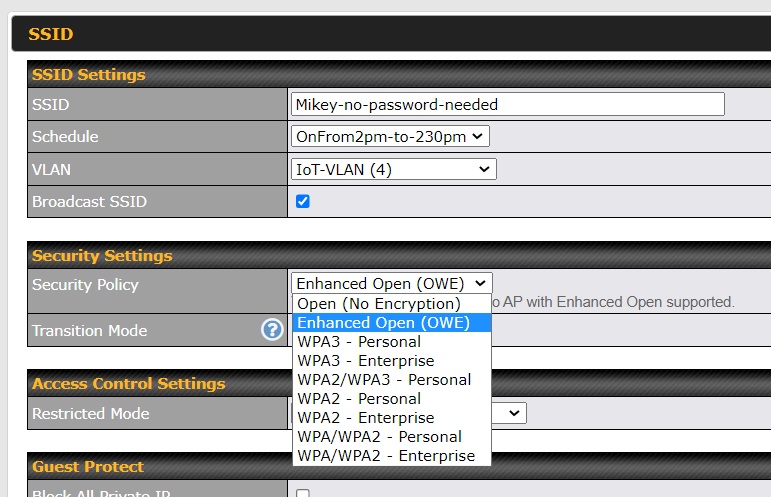
Network Segmentation Separates Risk Creating separate networks for family use, guests, and IoT devices adds enterprise-level security to home networks. If a guest’s device or your smart speaker gets compromised, it won’t automatically grant access to devices containing your financial data.
VPNs Aren’t Optional for Public WiFi Using a Virtual Private Network when connecting to public WiFi networks encrypts your internet connection, masks your IP address, and protects your online activity from attackers. This is especially critical for mobile devices where you handle sensitive transactions.
If you value your security and privacy, your Wi-Fi network deserves far more attention than it usually gets. Many people assume that having a password on their network is enough to stay protected, but today’s Wi-Fi threats are far more subtle. Vulnerabilities can stem from guest networks, outdated router firmware, automatic device connections, and even built-in security features designed to isolate connected devices. Research published in 2026 revealed that certain Wi-Fi isolation protections can be bypassed, highlighting an important reality: convenience often evolves faster than security.
Frequently Asked Questions
Q: Is WPA2 still safe to use? WPA2 is better than nothing, but increasingly vulnerable. WPA3 is strongly recommended if your devices support it. However, make sure it’s fully patched.
Q: Should I be worried about the SSID Confusion attack? The SSID Confusion attack (CVE-2023-52424) affects all operating systems and WiFi clients, allowing attackers to spoof trusted network names so victims connect to less secure networks. Stay updated and use strong passwords these measures significantly reduce your risk.
Q: Can I secure my WiFi without technical expertise? Absolutely. Start with changing your password, enabling WPA3 if available, and checking for firmware updates monthly. These three steps eliminate most common attacks.
Q: How often should I change my WiFi password? Unless you suspect a breach, changing it annually is sufficient. Focus instead on making it strong and keeping firmware updated.
Q: Is WPA3 enough to keep me safe? No. WPA3 is stronger than WPA2 in several important ways, but it does not protect you from bad passwords, malicious devices already on the network, or every form of traffic interception.
The Takeaway: Security Is Active, Not Passive
Walking away from my research, I realized something important: WiFi security isn’t a one-time setup. It’s an ongoing practice. Your router isn’t going to get more secure on its own, and new vulnerabilities will keep appearing as long as WiFi exists.
But here’s what gives me confidence: most attacks against home networks exploit known, patchable vulnerabilities. The gap between “vulnerable” and “reasonably secure” isn’t about buying expensive equipment or hiring professionals. It’s about staying informed and taking incremental action.
Your action items:
- Log into your router today and check the firmware version
- Change your WiFi password to something strong (if you haven’t recently)
- Set a calendar reminder to check for updates monthly
- Create a separate network for guests and IoT devices
- Run a scan using free tools like Fing to see what’s actually connected to your network
These steps won’t make your network unhackable nothing is but they’ll eliminate you as an easy target. And in cybersecurity, that’s often enough.
Keep Learning About Digital Security
Interested in going deeper? Explore how end-to-end encryption protects your privacy and why multi-factor authentication matters more than strong passwords. Security is part of everyone’s digital literacy now.
What WiFi security gaps have you discovered in your own network? Share your experience in the comments below your story might help someone else recognize a vulnerability they’ve been overlooking. Let’s build a community of people who actually care about their digital security.